> >

3

Download

Online Ecuador ID Photo Maker (51 x 51) mm

Create perfect Ecuador ID photos with our tool, ensuring your image meets all official size and background requirements.
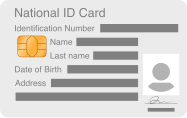
Document

Ecuador ID Card Photo

Size (51 x 51) mm
Resolution 300 dpi
Background White
Upload Photo
QR Code

Scan the QR code to Upload a Photo From your Mobile.

Now, you can also create your passport photos on your mobile with a single tap.

Install and Create Passport photo

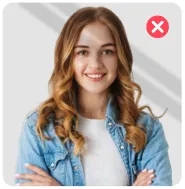
DO's and Don'ts
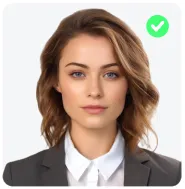
Neat and Tidy

Neat and Tidy

Do not Smile

Do not Smile

Head At Center

Head At Center

Avoid Shadows

Avoid Shadows

Look Straight

Look Straight

No Headgear

No Headgear

#FFFFFF

Original Photo:
Source
Loading

Resizing...

Converted Photo:
Standards compliance badge Complies With Standards
Country icon
Document icon
tick Resolution
tick Background Color
tick Photo Size
tick Fully Compliant
tick Printable
tick Suitable For Online Submission
Loading

Passport Photo Is Ready To Use.

Globally Accepted & Fully Country Compliant Standards


Please agree to the Terms of Service and Privacy Policy
Choose Your Photo Format
$2.99
  • Instant Download Of A Photo In JPEG, No Watermarks
  • 100% Compliance With State Requirements
  • Priority Customer Support
  • Free Re-Generation If Needed
1 Photo $0

The Free Plan Allows Downloading 1 Photo Per Day with watermark.

After The Payment Is Processed, The Photo Will Be Available For Download

🔒 SSL-Secured Payment
Locked preview
Pay To Unlock
0%

Wait 00:01:00

Pay To Unlock
Standards compliance badge Your photos are secure and compliant.

Your Photo Will Automatically Download After A Short Delay.

Free Credits Used Up

You've used your one free photo credit for today.

One-time payment
Process this image
$2.99
No Photo stored
Secure Payments
Country Compliant
How to Generate Your Ecuador ID Photo?

Follow these 3 steps to create your ID photo using our specialized Ecuador ID Photo photo generator.

Snap & upload
Snap & upload

Use your phone to take a clear, high-resolution photo against a plain white wall, or select an existing high-quality picture from your device.

AI Adjustments
AI Adjustments

Our AI Ecuador photo creator perfectly aligns your facial features, removes the background, and resizes the image to meet official Ecuadorian biometric standards.

Confirm & Save
Confirm & Save

Download your digital copy for online applications, or get a print-ready file for appointment.

Ecuadorian ID Card Photo: Size and Requirements

Ensure your Ecuador ID photo meets official standards. Use our AI tool to perfectly size and format your image for a compliant, professional result.

51 mm (378px)
Photo Dimensions 26 - 35 mm (50-69%) 29 - 35 mm (56-69%)
Recent Photo

Recent Photo

Taken within 6 months.

Background

Background

White, Off-white.

Size and Dimensions

Size and Dimensions

(51 x 51) mm

Resolution

Resolution

Minimum 300 dpi required.

Photo Quality

Photo Quality

Clear, no creases or marks.

Face Visibility

Face Visibility

Entire face fully visible.

Face Orientation

Face Orientation

Face straight, no tilt.

No Red-Eye

No Red-Eye

Red-eye effect not allowed.

Why Choose Our Ecuadorian ID Card Photo Editor?

Our web-based tool ensures your images meet the necessary standards required for Ecuadorian identification documentation.

AI-Driven Verification

Automatically detects your face, optimizes clarity, and aligns your features with standard biometric requirements, significantly reducing the risk of application rejection.

Instant Background Editing

Removes shadows or distracting backgrounds and converts them to the plain white background typically required for official identification photos.

Precision Sizing
Precision Sizing

Automatically adjusts your uploaded file to the required dimensions, ensuring your photo meets the necessary specifications for your application.

Ready-to-Print Downloads

Produce a high-quality digital image or a convenient, ready-to-print file layout directly through our platform.

Private & Secure Processing

All uploaded data is managed via secure, encrypted channels and removed from our servers immediately after your session.

Free-of-Cost Service

Our ID photo maker is free to use once for all applicants, before the official subscription process.

Frequently Asked Question
Everything you need to know about the product and billing.

The Cédula is the official national identity document in Ecuador. Issued by the Registro Civil, a mandatory plastic card for legal residents. Cédula contains your photograph, biometric information, and a unique identification number. Use the Ecuador cédula photo creator to ensure strict compliance with updated photo dimensions.

Reputable online tools prioritize user privacy. They often use secure, on-device processing so your photo is never uploaded to a server. Try out the free ID card photo creator for secure conversion.

If your photo is blurry, too dark, or has shadows, the ID card Photo maker will alert you and request a new photo to ensure the final product is accepted.

Your Ecuador ID card photo must be a recent 2x2-inch color photo with a plain white background, showing a neutral, full-face view with no glasses or accessories.

The Ecuadorian national identity card is officially called the Cédula de identidad. This essential document is the primary form of ID for all residents.

Yes. Simply upload a standard photo taken with your phone or camera. The ID card photo maker will automatically crop the image to the correct size and aspect ratio for your ID card.

Light, natural makeup is acceptable, but it must not alter your natural appearance. You can keep a beard or mustache as long as it is part of your everyday look.

You must face the camera directly with your head centered. Keep your head at level; do not tilt, turn, or angle it. Your shoulders should also be square and straight to the frame.

Wear everyday attire that contrasts well with a plain white background. Avoid wearing all-white or light gray clothing, as you risk blending into the backdrop.

Use balanced, natural front-facing daylight. Avoid harsh overhead lighting or side lighting that can cast dark shadows across your face or the background behind you.

Appearance
Close
0%
0%
Alert icon

Background color is not country-compliant. Revert Changes or proceed.

Alert icon

Background color is not country-compliant. Revert Changes or proceed.

0%
0%