Create an Indian ID card photo online and format it according to the required size and photo specifications.
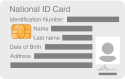
India Id Card Photo
| Size | 35 x 45 mm |
| Resolution | 300 dpi |
| Background | White |
Neat and Tidy
Do not Smile
Head At Center
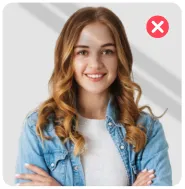
Avoid Shadows
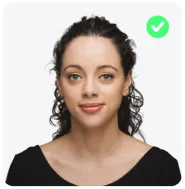
Look Straight
No Headgear
#FFFFFF
Source Photo:
Checking Your Photo...
Step 1 Of 2. Choose A Plan
Globally Accepted & Fully Country Compliant Standards
After The Payment Is Processed, The Photo Will Be Available For Download

Your photo meets with Country Compliant standards
Your Photo Will Automatically Download After A Short Delay.
Creating an Indian ID card photo is easy with this tool. Just follow the given steps
Capture a high-quality photo with your device's camera or upload an existing image from your mobile or computer.
Our AI India ID card photo generator removes the background if needed and crops your image to the required dimensions.
Preview the final photo to make sure it looks right and download your print-ready photos for your Indian ID card.
Indian ID card photos must meet the required standards. Check the specifications below to prepare your photo according to the applicable ID card requirements.
23 - 31 mm (50-69%)
25 - 31 mm (56-69%)
Recent Photo
Taken within 6 months.
Background
White
Size and Dimensions
35 x 45 mm
Resolution
Minimum 300 dpi required.
Photo Quality
Clear, no creases or marks.
Face Visibility
Entire must be visible.
Face Orientation
Face straight, no tilt.
No Red-Eye
Red-eye effect not allowed.
Explore the features below to see how this tool helps you prepare your Indian ID card photo
This AI-powered tool automatically verifies your photo according to the required Indian ID card specifications. It helps you prepare a correctly formatted photo with less effort.
Instantly replaces the existing background, if needed, with a clean, white background required for an official Indian ID card photo.
Automatically crops your uploaded photo to the exact dimensions required for Indian ID card photo guidelines.
Download your processed photo in a digital format for online applications and an A4 sheet containing multiple copies for printing.
All processed images are securely encrypted and automatically deleted after processing. You can easily upload your photo through a simple process without unnecessary steps.
Create your Indian ID card photo online without visiting a photo studio. This offers a convenient way to prepare your picture while saving time and effort.
Our online passport photo maker offers a complete set of features to ensure high quality and accurate results
No, you must avoid shadows on your face and background. Use perfect lighting and a plain white background to keep your Indian ID card photo clear and properly formatted.
Wear neat, everyday clothing in a color that contrasts with the white background. Avoid white clothing and outfits that hide your facial identity.
Yes, you can easily make an Indian ID card photo at home using our online India ID card photo maker. Simply upload your picture and let our tool automatically adjust it to meet the required photo specifications.
It is best to remove your glasses. However, if you need to use them for medical reasons, make sure they do not cause glare or reflections that may obscure your eyes.
For infants and children, use a clear, recent photo with the face fully visible, eyes open when possible, and a plain white background. Avoid shadows, toys, or other people in the frame, and follow the specific requirements for the ID card application.
Your photo may be rejected if it does not meet the requirements of the specific application. Common problems include incorrect dimensions, poor image quality, an unsuitable background, unclear facial features, or an improper pose.
Yes, you can use a selfie for your Indian ID card photo if it meets the official ID card photo requirements set by the Indian government.
Yes, your uploaded photo will be safe and secure. Without any issues, you can use our online India ID card photo maker.
Background color is not country-compliant. Revert Changes or proceed.
Photo is still here! 60:00
A4 PDF + Digital Photo
Notifications are blocked for this site. To get a reminder, open the site settings (the icon to the left of the web address) and set Notifications to Allow.