Generate Your Dominican Republic Passport Photo for Free! (51 x 51 mm)
Use this tool to create your own Dominican Republic passport photo that fully meets the official standards!
Dominican Republic Passport Photo
| Size | 51 x 51 mm (5.1 x 5.1 cm) |
| Resolution | 600 dpi |
| Background | White |
Now, you can also create your passport photos on your mobile with a single tap.
Install and Create Passport photo

DO's and Don'ts

Neat and Tidy

Do not Smile

Head At Center

Avoid Shadows
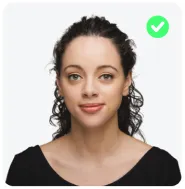
Look Straight

No Headgear
#FFFFFF
Source Photo:
Checking Your Photo...


- Face Is Clearly Visible And Recognisable
- Image Is Sharp And Good Quality
- Photo Is Suitable For Reliable Image Generation
- Head Position Is Suitable For Processing
- Face Is Directly Facing The Camera
- Subject Is Clearly Identifiable
Step 1 Of 2. Choose A Plan
Passport Photo Is Ready To Use.
Globally Accepted & Fully Country Compliant Standards
Choose Your Photo Format
After The Payment Is Processed, The Photo Will Be Available For Download
 VISA
stripe
G
Pay
VISA
stripe
G
Pay
Your photo meets with Country Compliant standards
Your Photo Will Automatically Download After A Short Delay.
Wait Don't Leave !
If you leave this page now, your photo credit will be lost.